Using Shelf
Readers and lending
One Shelf serves everyone you share it with. Each reader signs in to a shelf of their own, and no reader sees another's books, notes, highlights, or reading log unless they choose to share.
Readers
Each person makes an account with their name, their email address, and a password of at least eight characters; the first account is the admin. Readers sign in with their email address, which no two readers here can share, so two readers may have the same name. When the shelf can send email (with Email:PublicAddress set), a new address is confirmed first: a link goes to it, and the address is the reader's only once it is opened. Until then it is no one's, so giving someone else's address takes nothing from them; whoever opens their link first has it. A reader can sign in with an address still waiting, by their own password. The address is private: other readers see the name, and where two readers share a name, a hint of the address such as s…m@example.org to tell them apart. Accounts made before sign-in was by email go on signing in by name until their reader adds an address under Account, in Connections; an address given earlier for reminders already works for signing in. An address can be changed to another, which is confirmed the same way while the old one keeps working, but not removed.
A name that only one reader has also still works where a name was asked for before: the sign-in page, KOReader's progress sync, and Audiobookshelf apps. Each reader's settings are their own: language, region for dates, light or dark (under Look on Account; otherwise as the device is set), the reader's page and typeface, text size, read-aloud voice, audiobook speed, and the yearly goal. See Accounts and security for passkeys, two-step sign-in, and what an admin can do.
Children's accounts
A reader can make accounts for their children under Account, in Children's accounts: a name to sign in with, which no other reader here may have, and a password. A child needs no email address. A child signs in as themselves, keeps a shelf of their own, and reads the books you share with them:
- Put the books in a collection, under Collections.
- On the collection's page, tick Let … read the books in this collection.
The books appear on the child's Library page, under From …'s shelf, to read or listen to with their own place, highlights, and bookmarks, as if you had lent them. You can also lend a child any book of yours as usual.
A child's account can't lend books, open its shelf or borrow from other readers, share links, join clubs other than yours, make API tokens or webhooks, connect Readwise or Hardcover, delete itself, or be an admin. Other readers don't see it in their lists. From Children's accounts you can set a child's password or remove the account with its shelf. An admin can make it an ordinary account, under Admin, once the child is grown, or if you remove your own account.
Languages
Shelf's pages are in English, Spanish, French, and German. Each reader sees the language their browser asks for, unless they pick one under Language and region on Account. Emails, the reset link and notifications, go out in the language the reader picked. Dates and numbers follow the region separately, so a reader can have the pages in English and the dates written the German way.
The translations were made by machine and checked for consistency, but have not yet been read by native speakers. Corrections are welcome: Translating Shelf shows where the words are and the terms each language uses, or open a translation issue with the sentence and what it should say. A test fails when a sentence on a page is missing from a language, so a new sentence can't be left untranslated by accident.
Lending to another reader
On a book's page, under Lending, choose a reader and, if you like, a date it's due back, then Lend. The book stays on your shelf, marked as lent to them, and appears under Borrowed on their Loans page.
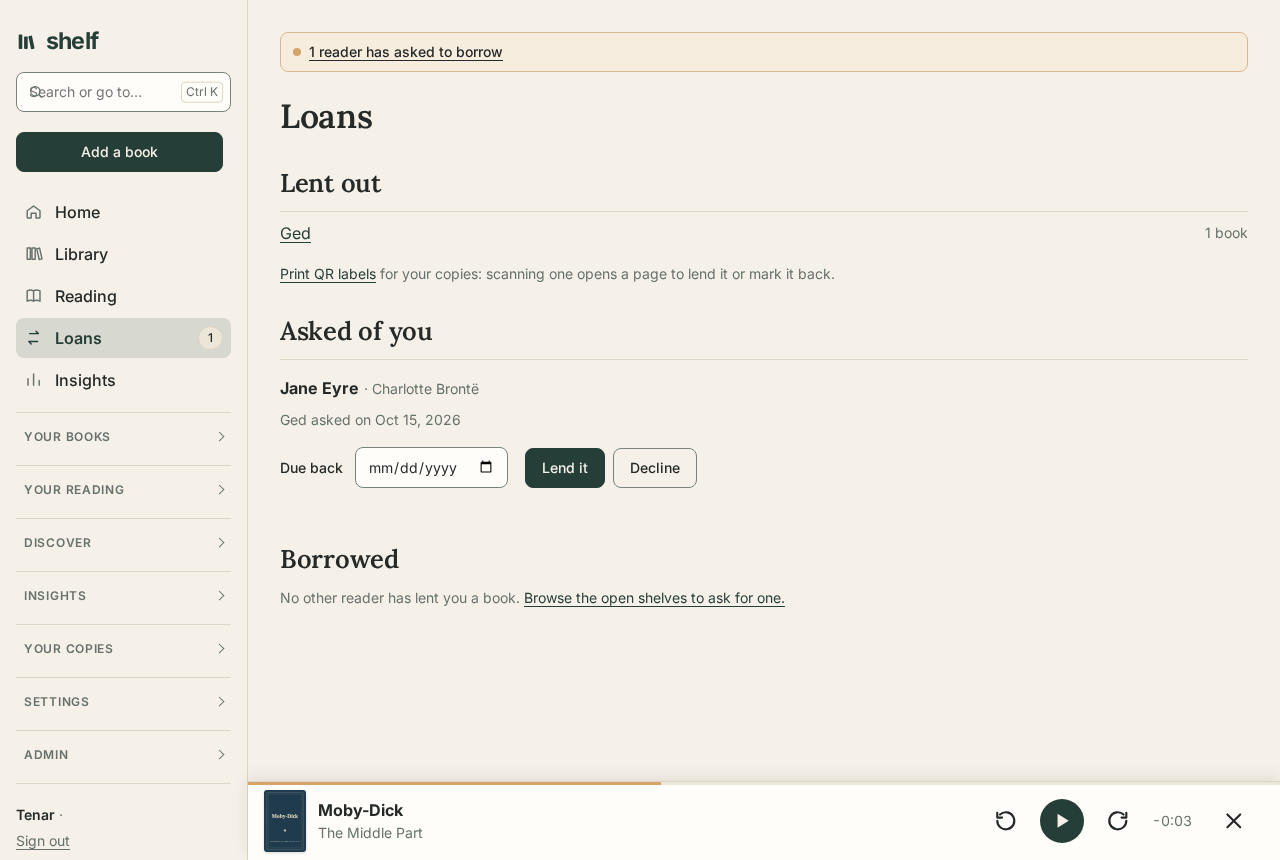
While it's out, the borrower can:
- read its e-book and play its audiobook from Loans, with a place of their own;
- highlight passages and keep bookmarks of their own, which stay theirs;
- search inside it along with their own books;
- give it back when they're done.
Your own place, highlights, notes, review, and reading log stay private and unmoved; the Lending section says so as you lend. A paper copy lent this way just notes who has it and when it's due back. Either of you can end the loan: you with Mark returned, they with Give it back.
Renewals, condition, and the record of loans
While a book is out, Renew moves its due date on by as long again as the loan first ran (two weeks if it had no due date), from the due date or from today if that has passed. Mark returned asks the state it came back in, the same Fine, Good, Fair, or Poor as the copy's condition, and a note if there's something to remember.
Every loan is kept after it ends: who had it, when it went and came back, how often it was renewed, and the state it went out and came back in. A book's page lists its earlier loans under Lending, and Loans lists the loans that have ended.
Waiting in line
When more than one reader asks for the same book, they wait in the order they asked. Loans shows the owner who is waiting for which book, and each reader who asked sees their place in line. When the book comes back, the first in line is told it's free.
QR labels
QR labels, under Your copies, prints a label for each copy at a place, each one on loan, or each paper copy with no place noted. Stick one inside the cover: scanning it with a phone's camera opens that copy's page on your shelf, to lend it (to a reader here or anyone else, with a due date) or mark it back with its condition, standing at the shelf. The page opens only for you, signed in.
Lending to someone else
For a friend who isn't a reader on your shelf, type their name in the book's Loaned to field, with a due date if you like. It shows on Loans like any other loan.
Open shelves
From Account, a reader can open their shelf to the others. The other readers then see its books under Shelves: titles, authors, covers, and whether each has an e-book or audiobook, but never notes, reviews, quotes, highlights, or where the owner stopped. It is searched, sorted, and shown as covers, a list, or a compact table as your own library is, 60 books at a time: by title, author, series, or ISBN; by author, title, series, year, or the most recently added; only those not lent out now, or with an e-book or audiobook; and by an author or series, from their names. Nothing about the owner's reading narrows it, so there is no status, stars, tags, or loved. Your own shelf isn't listed under Shelves for you; that page lists the shelves others have opened.
On an open shelf, Ask to borrow sends an ask. Asks wait on the owner's Loans page until they lend the book or decline, and the reader who asked can take an ask back.
Shelf also points out open shelves where they help:
- adding a book that someone has on an open shelf offers to ask to borrow it instead;
- a book's Files panel mentions when an open copy has an e-book or audiobook yours lacks, before you upload your own.
Only shelves their owners opened are ever mentioned.
The calendar
Calendar, under Your reading, lists what the household's reading asks of you, a month at a time: books due back to you and books to give back, your book clubs' meetings at their time, collections to read by a day (your own, and for a child's account the ones their grown-up shares), and the last day of the year for your goals. Only what is yours, or what you share with someone, is in it: a loan between you, or a club you are both in. No one's reading is shown to anyone else.
Under Account, Calendar and public page, Make a calendar address gives an address to subscribe to in a calendar app (Google Calendar, Apple Calendar, Outlook, Thunderbird) with all of it: loans as days, meetings at their moment, shown in the app's own time zone. The address is shown once and works without signing in, so keep it to yourself; Make a new address replaces it, and Stop the calendar ends it.
Linked shelves
Two Shelf servers can be linked, say yours and a friend's, so the readers of each can see the other's open shelves and borrow from them.
Linking. Both shelves need their own address set, Email:PublicAddress, and must be able to reach each other over the internet. On one, an admin goes to Admin, Linked shelves, and chooses Make a link code. They send the code to the other shelf's admin, who enters it under A code from another shelf and chooses Link. A code works once, within a day. Each shelf then holds a secret of its own for calling the other; Unlink ends it from either side.
Borrowing. Under Shelves, On linked shelves lists the open shelves there. Asking for a book works as it does here: the ask waits on the owner's Loans page, under Asked of you from linked shelves, until they lend it or decline. When they lend it, a copy comes to the borrower's shelf, with its e-book and audiobook, to read and listen to like any other, marked whose it is and when it's due. Copies arrive when the borrower opens Loans, or within the hour.
Giving back. Give it back under Loans returns it, and the owner can mark it returned as with any loan. Either way the copy's files go from the borrower's shelf; the book itself stays there with their notes and highlights, marked finished. A copy can't be lent on.
What a linked shelf sees is what an open shelf shows anyone here: titles, authors, and covers, never notes, reviews, or places. Files go only for a book lent to a reader there, while it is lent. Children's accounts don't take part.
Reminders
A notice under the header points to Loans when:
- a loan of yours is overdue;
- a book lent to you is due soon, within three days unless you choose another number of days on Account, under Notifications;
- someone has asked to borrow from you.
With email set up, the loans due soon or overdue come once a day by email too, with the rest of a reader's notifications, and a reader can reset a forgotten password from the sign-in page.
Book clubs
Readers on the same shelf can read together. On Book clubs, start a club and invite the readers you want; a club you are invited to appears in your list.
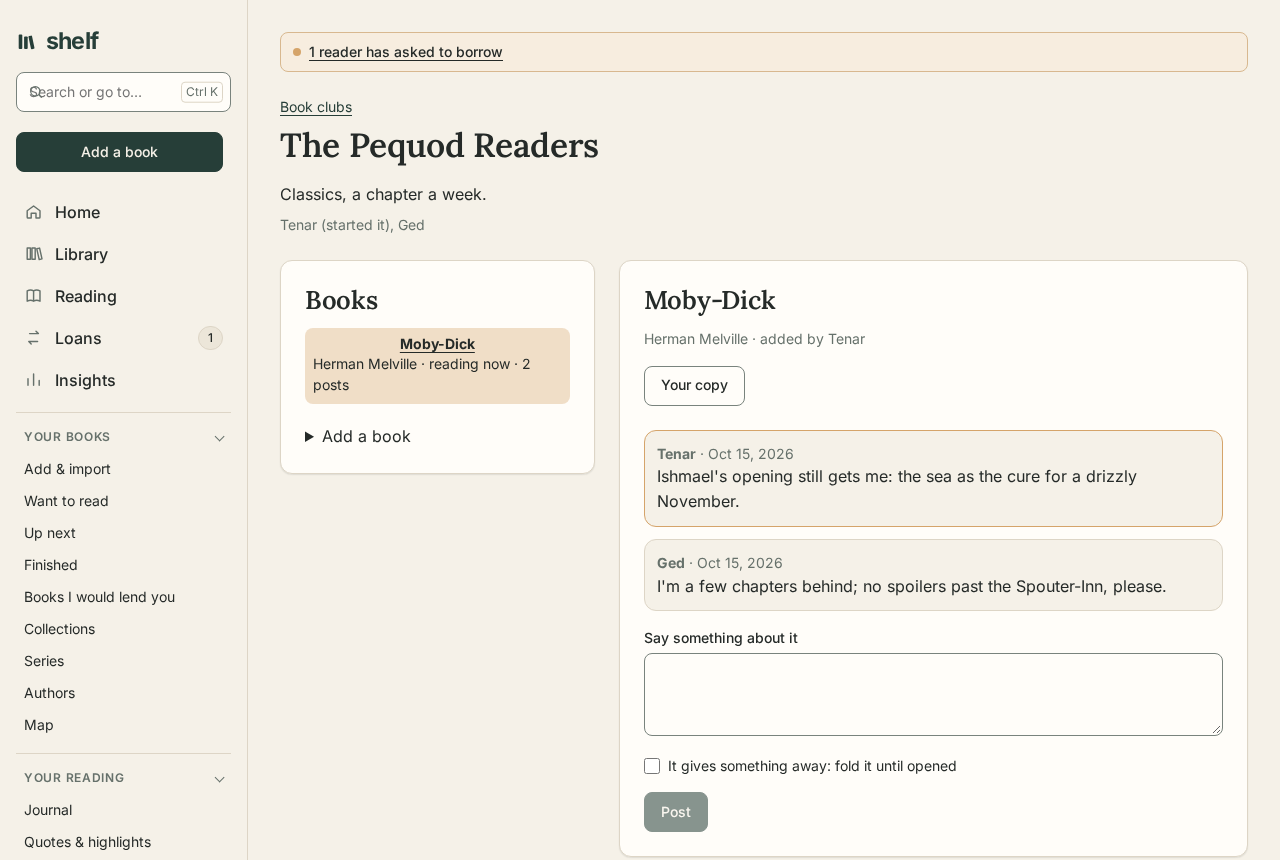
- Books. Any member adds a book, from their own shelf or by title and author. The first one added is the one being read now; Read this one now picks another.
- Talking. Each book has its own conversation: choose it in the list and say something about it. Everyone in the club sees what everyone says. Tick It gives something away on a post that would spoil the book for someone further behind: it is folded away until they open it, and notifications and webhooks leave its words out.
- Meetings. The reader who started the club arranges them under Meetings: when, which book, how far everyone reads by then, and what to talk about. Members hear of a new one as they do of posts. Before a meeting, any member sends questions for it; until the meeting begins, a question is seen only by the one who asked and the one who runs it, so nobody's steers anyone else's. Afterwards, Write what was said keeps a summary with the meeting. Each member sees a meeting's time in their own browser's time zone; notifications give it in the zone it was arranged in, named. Its questions open to everyone at that moment.
- Your own copy. Put it on my shelf adds the book to your shelf to read; when you already have it, Your copy opens it.
- Who does what. The reader who started the club invites and removes members, and can end it. Anyone else can leave.
A club holds only titles and what members say: nobody's notes, highlights, or files are shared, and each member's copy stays on their own shelf.