Using Shelf
Your library
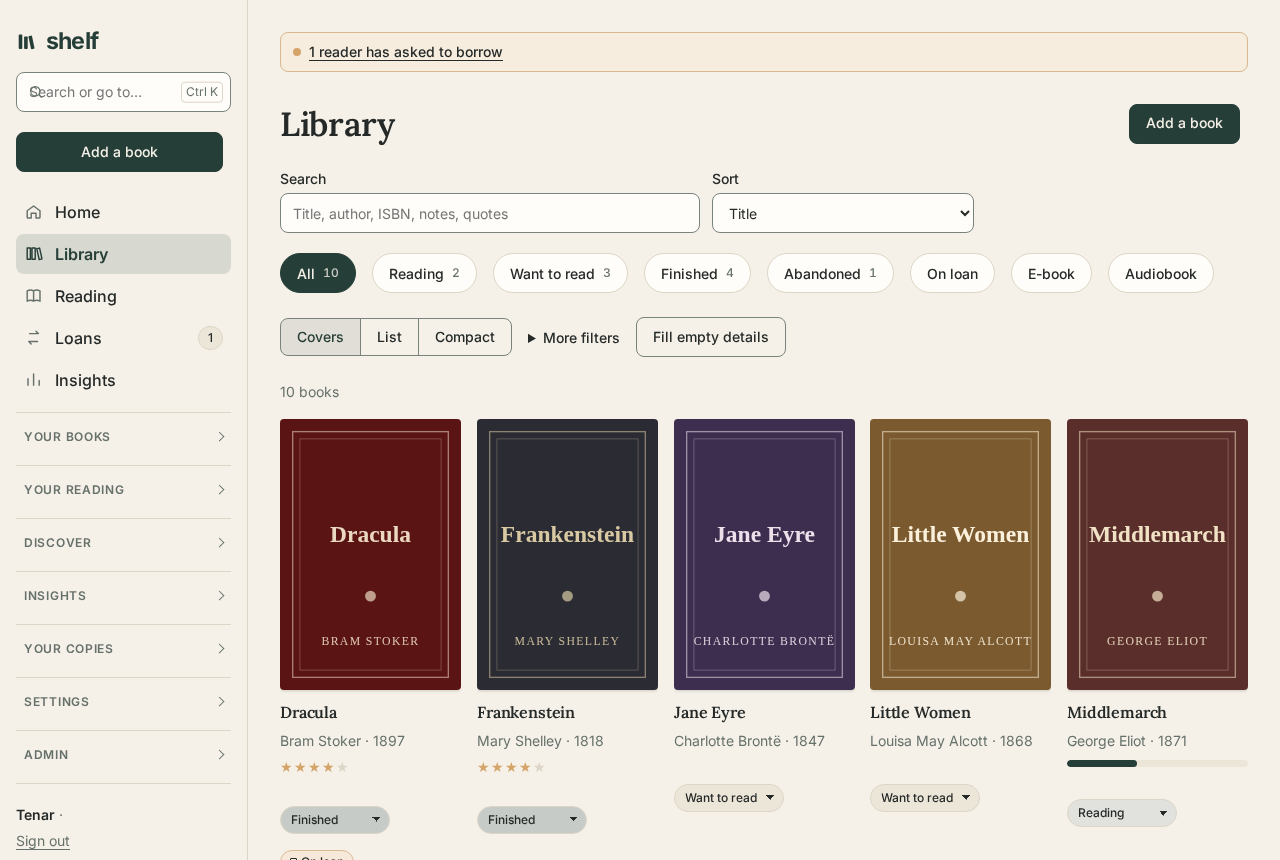
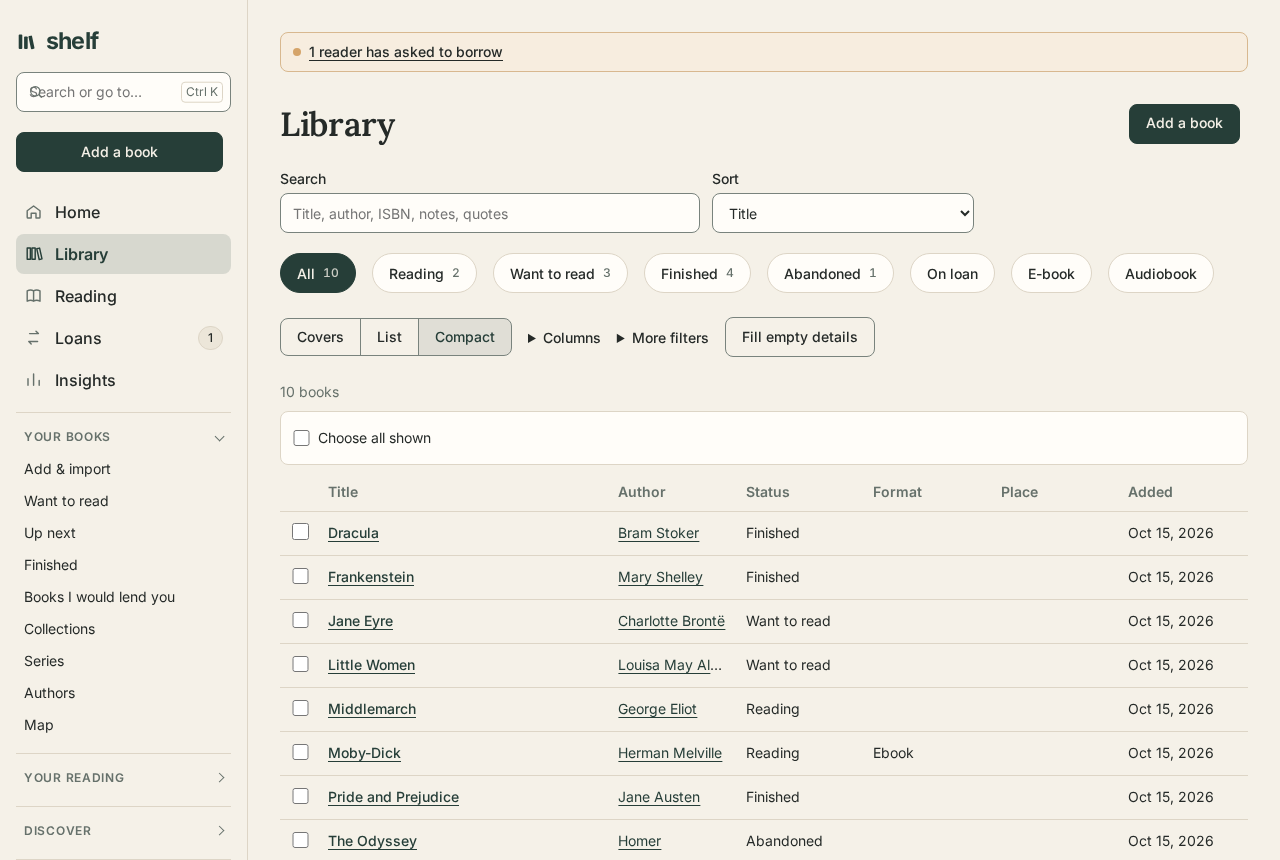
Home is the front page. When something wants you, Needs you comes first and names it: a book you lent that's overdue, a borrowed one due back within three days, a reader asking to borrow, new books in series you follow or by authors you follow. Otherwise it isn't there. Then the book you were last in leads, with a button straight back into it, and after it your shelf at a glance (reading, want to read, finished this year against your goal, on loan), the other books you're reading, what to read next, what you added lately, and what you finished. Arrange Home, at the bottom, hides any of those and puts them in the order you like, on every device. Library holds every book on your shelf, as covers, a list, or a compact table (one line a book, with the columns you choose, and every match in one scroll), with search, chips for each status and for books on loan, e-books, and audiobooks, and an order that's kept for next time. On a cover, the status is a menu: change it there without opening the book. Reading gathers the books you have open, each a tap from your place, with your reading log of the last weeks and what you noted on the way.
Finding your way
The menu keeps the five places you go most at the top (Home, Library, Reading, Loans, Insights), then groups the rest: Your books (Add & import, want to read, up next, finished, your saved searches, collections, series, authors, the map), Your reading (journal, quotes, words, calendar, book clubs, the reference desk), Discover (finding new books, what to read next, free books, podcasts, asking your shelf, searching inside books), Insights (years, reading DNA, your collection over time), Your copies, and Settings. A group opens by itself on its own pages. Under Account, Menu leaves out the pages you don't use; they are still there.
Help, under Settings and at the foot of the menu, lists these guides, and says who looks after your shelf if you are stuck. Many pages also have a ? beside their name, which opens the guide to that page, and Server health links each thing to fix to how to fix it. The guides open in a new tab, from this site, so a shelf with its own copy of them sets DocsUrl to it.
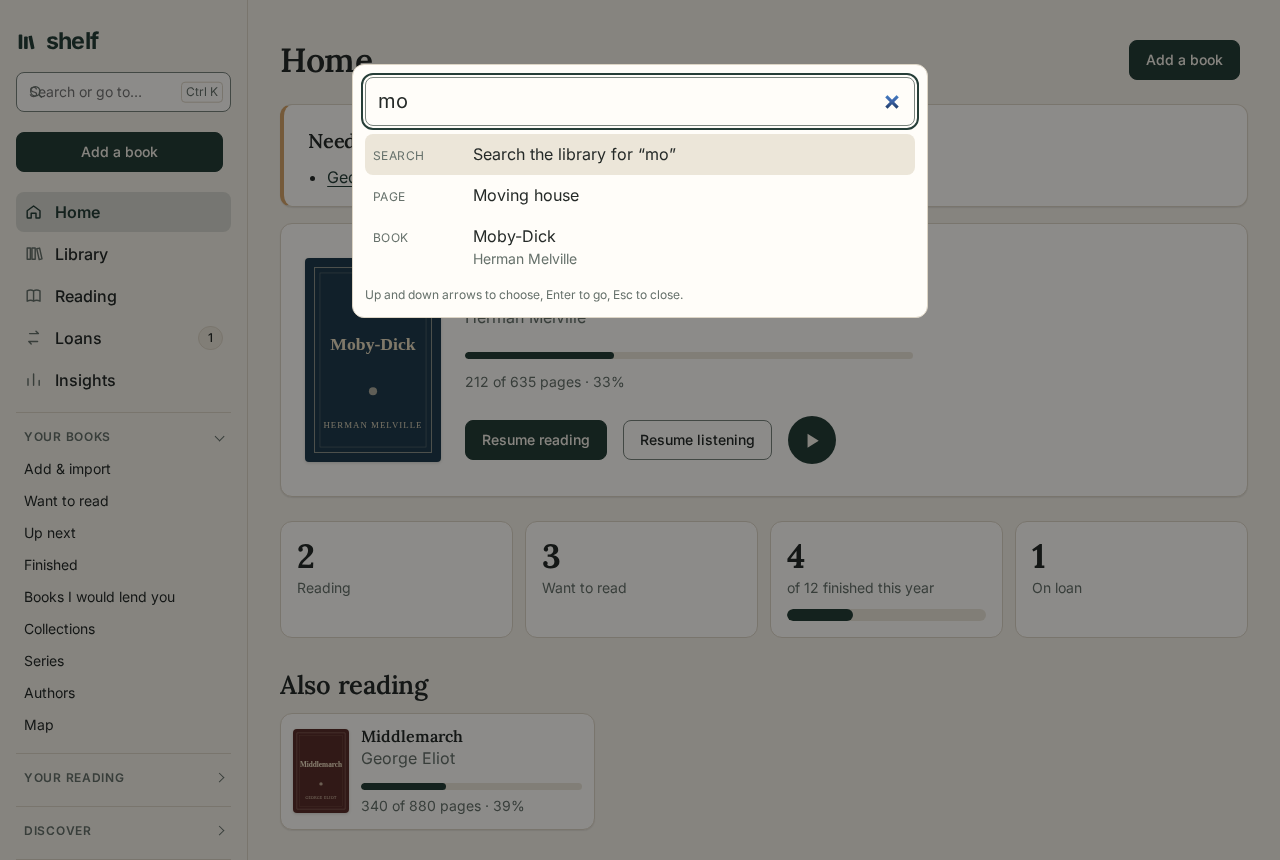
Search or go to…, the box at the top of the menu (or Ctrl K, ⌘ K on a Mac, or / when you aren't typing), searches the library when you press Enter, and as you type finds any page by its name or what it's for ("goodreads", "passkeys", "dark"), and any of your books, authors, series, places, and collections by a few letters of their names. The arrow keys choose among them, and Enter goes; when what you typed is the very name of a page or book, Enter goes there instead of searching. ? lists every keyboard shortcut. Before you type, the pages and books you opened lately on this device come first.
On a phone, a bar along the bottom keeps Home, Library, Reading, and Insights a tap away, and Add opens a short list: scan books, type a title or ISBN, or more ways to add. In the library, more books come as you scroll.
A book's page is in tabs: Reading (the reading log, quotes, highlights, where each device has you), Details, Your copy (the copy itself, lending, and its files), and History. Account is too: You, Sign-in & security, Connections, and Notifications. A link to a part of either page, from anywhere in Shelf, opens the tab it's in; ?tab= in the address chooses one too.
When you mark a book finished, its page offers a rating, a quote to keep, and the next book from your read-next list. Take any of them, or dismiss it.
Statuses
Every book is one of four, each shown with a different small shape as well as its word, so status never depends on color:
| Status | Means |
|---|---|
| Want to read | On the list. Mark one Read next to bring it to the front. |
| Reading | Underway. Moving a book here fills in a blank start date. |
| Finished | Done. Fills in a blank finish date, and a blank start date when it was finished today (a book finished on an earlier day you give keeps no start but the one you give). Counts toward the year's goal. Read it again starts another read. |
| Abandoned | Put down. Pick it up again moves it back to Reading. |
Reading a book again
Read it again, on a finished book's page, puts that read by, with its dates and the stars you gave it then, and starts the book over: Reading from today, its place in the e-book, the recording, and on paper back at the start. Every read is kept. Under the reading log, Each read lists them, with the sessions, highlights, and quotes from each one's days, and Write about this read keeps a few words about what you made of it then and what changed since. Each finish counts in its own year, on Insights, Years, the year's review, and your goal, so a book read in 2019 and again this year counts in both.
Can't choose what to read next? /books/pick picks one book from the want list.
The catalog
A book's details hold as much or as little as you like:
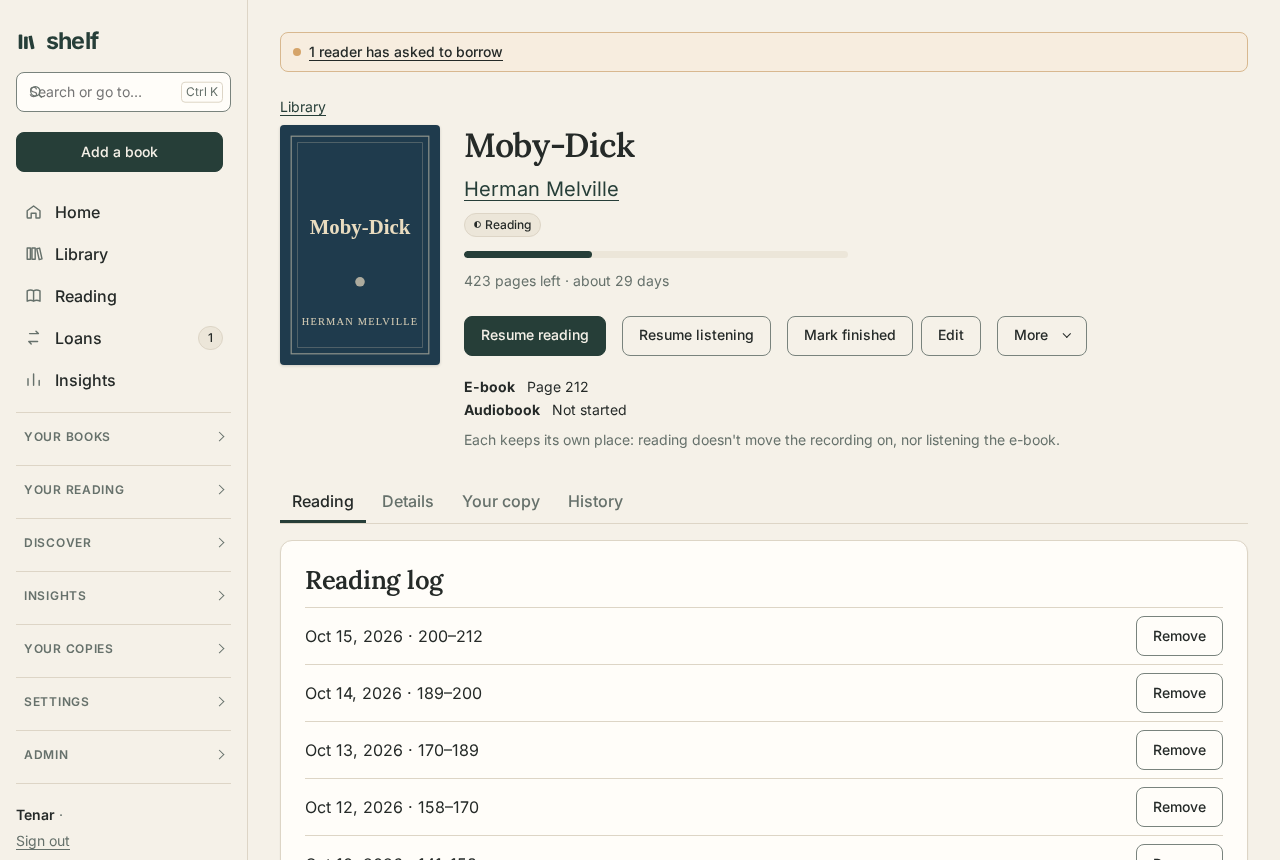
- Title, subtitle, author, and year, with the original title of a translation and its translator, and the narrator of an audiobook (search finds narrators too).
- Series and number, so the next volume is offered from the book's page.
- ISBN, publisher, language, page count, and format (hardcover, paperback, e-book, or audiobook).
- About your copy: where it sits, its condition from fine to poor, how it arrived (bought, a gift, or found), the date, any inscription written in the front, who recommended it, who had it before you, and whether the author signed it. Under Your copy on the book's page, keep up to 20 pictures of it, each with a few words: the inscription, a signature, a bookplate, the spine. Only you see them; they go with the book's snapshots and are deleted with it.
- Your own words: a rating, a review, notes, and tags.
Give an ISBN, or a title and author, and Look up fills the empty fields from Open Library, cover included, whether you are adding a book or editing one. When Open Library has no match, or leaves the pages, publisher, year, or cover blank, Google Books fills those in; it knows many newer and non-English books Open Library does not. Where you have connected Hardcover, it is asked last, for what is still blank, the series and its number above all. Open Library's answer always comes first. In the library, Fill empty details looks up every book with gaps, in the background, a book at a time with a pause between them so the catalogs are asked politely (Details:PauseMilliseconds, 1200 by default): leave the page and it carries on, and Activity shows how far it has got. Neither touches anything you wrote.
Tags are kept in lowercase, and an ISBN can be typed with or without hyphens.
Views and filters
The library shows covers or a list, and remembers your choice. Search, status, and sort are always in view, with chips for books on loan, e-books, and audiobooks; Loved and Read next sit under More filters. A filter from elsewhere (an author, series, tag, place, or recommender you followed a link from) shows as a chip of its own under the list's tools, and so do the ones under More filters: tap one's × to take it away, or Clear filters to take them all.
The address keeps up with what you choose, so a filtered library can be bookmarked, and opening a book then going back finds the same books, as far down the page as you were.
Pages gathered from the catalog give other ways in: Authors, Series in reading order, Places where books sit, Condition, Recommenders, and Years of finished books. A copy you let go (see Your collection over time) is kept out of the library until you tick Let go under More filters.
Places
Places, under Your copies, holds where your paper copies are: rooms, the bookcases in them, their shelves, and boxes, as deep as you like. Drag a place onto another to put it inside; every copy's place follows, as it does when you rename one. A copy's place is written out in full on its page (Study › Oak bookcase › Shelf 3), and filtering the library by a place takes in everything within it. Make them places turns the places your books already name into places, a place written with › becoming one within another.
A place can be for a time, such as a storage unit: a copy put there remembers where it usually lives, its page says so, and Put it back takes it home. Each place's page lists its copies, to move together, check against the catalog with a scan, or put back. Shelf labels prints a label for any place, with a QR code that opens its page.
Moving house
Moving house treats a move as a run of numbered boxes. Number a new box, saying where it is packed and where it is going, then Pack it: scan each book as it goes in, and it is noted in the box, keeping where it lived. Print the box's label, with its number large, where it is going, and what is inside. At the other end, Unpack it: scan the books as they come out, and when you're done they go where the box was going (or back where each lived), and the books not seen are named, and can be tagged missing. Put them all back where they live ends a stay anywhere at once.
Up next
Up next, under Your books, is the short list of books you mean to start soon, in your order: drag them, or move them a step at a time. Read next on a book puts it there. Hold keeps one waiting until a day, or for a mood ("for the winter"), without losing its place; a book in a series waits, unheld, for the one before it. When you finish a book, its page offers the next of its series first, then the queue.
Your year in books
Each year on Years, and the current one on Insights, links to a review of it: how many books you finished, their pages, the hours you spent reading and listening, how many authors (and how many were new to you), your goal, a wall of the covers in the order you finished them, a month-by-month chart with your busiest month, the first, last, longest, and shortest books, your formats and most read tags, the books you loved or gave five stars, and the quotes and highlights you kept, with one to remember the year by.
Share my year makes a picture of it, sized for a post: the year's numbers, the covers of what you finished, the longest book, and a favourite quote. On a phone it opens the share sheet; elsewhere it saves the picture. The picture is made in your browser from your own shelf; no other server sees it.
Saved searches
A view you come back to, such as loved, want to read, newest first, can be kept: set the filters and order, choose Save this search, and give it a name. It joins Your books in the sidebar, and opens with the same filters and order every time. Forget this search, on the open search, removes it. Saved searches are yours alone; every filtered view is also a plain address you can bookmark.
Collections
A collection is a list you make by hand, in the order you choose: a book club's year, summer reading, books to lend a friend. Unlike a saved search, it holds exactly the books you put in it. Make one on Collections in the sidebar; then, on a book's page, choose it under Collections and Add. On the collection's page, ↑ and ↓ change the order and × takes a book out; Rename or describe gives it a name and a few words about it. Deleting a collection leaves its books on your shelf, and deleting a book takes it out of every collection.
Say why it's here keeps a note on a book in the list: why it belongs, what to look for, what to read first. A collection can be a plan, too: give it a day under Read these by, and Shelf works out whether the books left fit, at your own pace (the pages of the books you finished over the last year, a day at a time). When they don't, it says which later day would fit, or how many of the longest books to leave out, and Move the date takes the later day. Plans change; nothing is lost when they do.
Connections and the map
On a book's page, Connections draws a line from it to another of your books: another edition or translation of the same book, one that inspired it, one that answers or argues with it, one that makes a contrast, or simply one to read beside it, with a note if you like. Linked editions are listed under the title, each told apart by its translator, narrator, format, or language, with the one you read marked. Map, in the sidebar, draws your links: around one book, two steps out, or every linked book at once. Choose a book in the drawing to move to it; the same links are listed in words below.
Sharing a reading list
A saved search or a collection can be shared with anyone, signed in or not: open it and choose Share by link, then copy the address shown. The page behind it lists the books as the search finds them at that moment, with their covers, authors, years, series, and your stars, and in a collection the notes you wrote for the list; never your notes on the books, reviews, quotes, loans, places, or files. Search engines are asked not to index it. Stop sharing ends the link at once, as does forgetting the search; sharing again makes a new link.
New books in your series
On Series, tick Tell me when a new book comes out in a series I am reading. Once a day Shelf asks Open Library about each series you are reading or have finished a book of, sending only the series and author names. A book in the series that is newer than yours and not on your shelf appears under New in your series, and the sidebar's Series shows how many are waiting. Want to read adds it to the want list, numbered after the last one you have; Dismiss lets it go. Either way, the same book is never offered twice. Look now asks straight away. With notifications by email on under Account, and new books in your series among the kinds you hear about, new books found by the daily look come by email too, each book once.
Box sets and collections are left out. Open Library knows the series of many books but not all, so a book it has not filed under the series is missed; the series name on your books should match Open Library's (with or without a leading The).
Reading DNA
Reading DNA, under Insights and linked from Insights, is what your own shelf says about your reading: the subjects (your tags) and authors you return to, with books you loved or rated highly counting for more; what each recent year was mostly about, and which subjects you read more of lately or less than before; subjects and authors you own plenty of but have hardly read; and books you have had a year or more and not begun that fit what you read, each saying why (the next in a series you read, by an author you loved, about a subject you read often). It is worked out on the server when you open the page, from your shelf alone, and kept nowhere.
What to read next
What to read next, under Discover & reflect, suggests books from what's already here, without sending anything anywhere:
- Next in your series: for each series you're reading or have finished a book of, the next one on your want-to-read list. Later books wait their turn.
- New in your series: books the daily look found (see above), to add.
- From your want-to-read list: your queue first, then books by authors whose books you loved or gave four or five stars, then books whose tags (subjects) you share with those, each with why.
- On other readers' open shelves: books you don't have, by authors and on subjects you love, to ask to borrow.
The more you rate, love, and tag, the better they get.
A public page
Share a public page, under Account, makes a page anyone with its address can see: the books you're reading, the ones you finished lately with their stars, and your count for the year. Notes, reviews, loans, and everything else stay private. It comes with:
- a widget to put on a website or blog, as an
<iframe>(the code is on the Account page), showing what you're reading now; - a feed of books you finish, for a feed reader;
- the same as JSON, at
/public/<address>/shelf.json.
Turning it off ends the address; turning it on again makes a new one.
Where to get it
A book with no e-book has Where to get it on its page. Shelf asks Project Gutenberg, LibriVox, and Open Library for it (by title and author, nothing else):
- a free e-book from Project Gutenberg, or a free audiobook from LibriVox, comes to that book with Add it to this book, as Free books would bring it;
- Open Library's copy opens there, to read free or to borrow;
- Find a copy near you searches WorldCat for libraries that have it, and Borrow with Libby searches OverDrive's catalog for the e-book or audiobook at your library.
Answers are kept for a day. Availability:Enabled turns it off; it follows FreeBooks:Enabled unless set.
Tidy up
Under Your copies, Tidy up puts a shelf brought in from files and other servers in order. Nothing changes until you choose it:
Covers and details: how many books have no cover, and how many lack a year, pages, publisher, or language. Find covers looks up a cover for each book with none (and changes nothing else); Fill in all missing details fills every gap. Both run in the background, a book at a time.
Details to look over: to see before anything changes, Look over details asks Open Library and Google Books apart, for the books missing details or for every book (to find details gone stale). Each difference from your book is listed with what each catalog says, the ones where they disagree marked. Choose for each, or take everything they agree on; nothing they disagree on is taken until you choose.
Files: whether any of your books' e-books, audiobooks, or pictures is missing, has changed since it was saved (which means damage, as Shelf never writes a stored file twice), or can't be read, as the weekly file check found them; and the newest nightly backup proved to restore. An admin can run the check at once.
Authors written more than one way: "Le Guin, Ursula K.", "Ursula K Le Guin", and "URSULA K. LE GUIN" are the same person. Each group lists its spellings with how many books use each; choose the one to keep, or use the most common spelling for every group at once.
Series inside titles: titles like The Tombs of Atuan (Earthsea Cycle, #2) or Discworld 08 - Guards! Guards! name their series. Taking it out leaves the title alone and sets the series and number, so the book shows with the rest of its series.
Gaps and oddities: paper copies with no ISBN, books in a series with no number, books with no author known, and page counts that look wrong (past 5,000, or far from the other copies of the same book), listed to open one by one. Nothing changes from here.
Formats that may not last: files in formats few programs will open in years to come (Mobipocket, Kindle's own,
.lit, a comic in RAR, Audible's.aax) or locked by the shop they came from, each with what would last better.Publishers written more than one way: "Penguin Books", "Penguin", and "PENGUIN BOOKS LTD" are one publisher; choose the spelling to keep.
Every change made here, details filled in included, can be undone at once under Trash & undo.
Your collection over time
Your collection over time, under Insights, follows the shelf itself rather than the reading: year by year, the copies that came (by the day acquired, or added), were finished, and left, how many were kept at each year's end, and what was spent and got back. Beneath, what waits to be read, by how long, format, subject, and series; the books never opened in two years or more, the longest waiting first; and the books read again and again.
Price paid, among a copy's details, counts toward what was spent, in the currency set by Shelf:Currency. Let this copy go, on a book's page, records that it was donated, sold, given away, discarded, or lost, when, to whom, and for how much: the copy leaves the library and the queue, and keeps its record and your reading. It's back on the shelf undoes it. Goals for reading what was already on the shelf when the year began, and for letting copies go, are under Insights.
Rules
Rules, under Settings, do small things for you when something happens to one of your books: when a book is added, started, finished, read again, lent, or comes back, or when a loan is overdue. A rule can ask that the book have a tag, author, series, format, rating, place, or be loved, and then tags it, takes a tag off, puts it in a collection or takes it out, puts it in your queue or takes it out, marks it loved, notes it at a place, or tells you, by every way you set up notifications.
Try it shows what a rule would do to your books as they are now, and changes nothing. A rule acts a moment after the change that set it off; each run is listed under What rules did, and what it changed can be undone under Trash & undo. What rules do never sets off rules, so two can't keep answering each other.
Ask your shelf
Ask your shelf, under Discover, answers questions in everyday words from your own books, notes, and quotes, each with a link: "Which unread books do I own about Roman history?", "Find the mystery novel my friend recommended last year", "Which books in the Discworld series have I not read?", "Show my favourite quotes about creativity". It says how it understood the question. The words are read by simple rules, in English; when an admin has set an Anthropic key (Recap:ApiKey), the question alone is read by the model, in any language, to say what it asks, and the answer still comes only from your shelf. Nothing from your shelf is sent. Ask:UseModel set to false keeps the question on the server too.
Your library's future
Your library's future, under Settings, keeps what you would like done with your books should you be unable to see to them: a word for whoever looks after it, and who is to have which books, by a tag, a collection, or everything no one else is to have. It is sealed with the server's keys where it is kept, and shown to no one but you. Print the plan and Download the list of books give it to keep with your papers. It is a note of wishes, not a will.
Activity
Activity, under Settings, lists everything Shelf is doing for you in the background: imports, details being filled in, books brought by keeping in step, and the slower work on single books (read-along transcripts, reading scanned PDFs, making an M4B). Each running job shows its progress and can be stopped; finished ones stay listed for a while, folded to a line with what they did.
Duplicates
Under Your copies, Duplicates lists books that look like the same book: the same ISBN, the same title and author (case and punctuation aside), or, by the same author however written, titles alike but for a subtitle, what is in brackets, a word saying which edition, or a word or two. Each group says how sure it is, the surest first. These are different books keeps a group from being shown again.
Choose Keep this one on the entry to keep, and Shelf first says what merging will do: what comes across from each of the others, and which of their files stay behind because the one kept has its own. Nothing changes until you choose Merge. The others merge into it, and then go to the trash with the files left behind, so a wrong merge can be taken back:
- its empty details are filled from them, the further status wins (finished over reading over wanting to read), with the earliest start and the latest finish;
- tags, notes, reviews, quotes, highlights, the reading log, time spent reading and listening, and collections come across;
- an e-book, audiobook, or cover picture it has none of comes across with everything that belongs to it. Where both have a file of one kind, the one kept stays, and the other's goes to the trash with it, with the bookmarks in its recording.
A book out on loan can't be merged away until it's back.
Changing many books at once
In the list view, tick books to change their status, add or remove a tag, mark them loved, put them at a place, or delete them, up to a thousand at a time. Choose all shown ticks the books on screen; Choose all that match ticks every book the search and filters find. Each change is kept as one, undone from Undo beside the message that reports it, or later under Trash & undo.
Trash and undo
What you delete isn't gone at once. A book goes to the trash with everything that was part of it (quotes, highlights, the reading log, earlier reads, pictures of the copy, its place in collections) and its files stay where they are; a quote, a reading session, or a highlight goes there alone. Trash & undo, under Settings, lists them with the days each has left, 30 by default (Trash:Days). Bring back puts one back as it was, a book under its own id when no other has taken it, so links and devices that knew it find it again. After that the trash lets things go for good, with the files only they kept; Empty the trash does it at once.
Changes to many books at once are kept together: an edit to a selection, books deleted together, an import from a backup or a spreadsheet, books scanned in, details filled in, a missing tag after a shelf check, and the changes made under Tidy up. Each is listed with how many books it touched and can be undone as one. Undoing sets each change back only where the book is still as it left it, so anything you've changed by hand since stays; books it brought go to the trash, and books it deleted come back.
A book deleted longer ago than the trash keeps things may still be in a nightly backup.
A book's history
On a book's page, History lists every change to its details, newest first, a year back (History:Days): what each was and what it became, and which change to many books it was part of. Put back sets a detail as it was before a change, whatever it is now. Where a copy sits, progress, and files are left out; they change often and have their own ways back.
Covers
A book's cover is, in order of preference:
- A picture kept on the shelf. Upload one under Files on the book's page (JPEG, PNG, GIF, or WebP, up to 10 MB). Art embedded in an audiobook, or a cover from an import, is kept this way when the book has no cover yet.
- A cover address in the details, which Open Library fills in.
- The cover inside the e-book, or a comic's first page.
With none of these, the book shows a plain green spine with its title.
The reading log
Log a session from a book's page: the date, the pages you read from and to, and a note. Sessions feed Insights: the year's goals and how you are doing, books finished each month, a year of the days you read and listened, the authors, kinds of book, and series you return to, milestones (your first finished book, the tenth, ten thousand pages, the longest book, the year's goal reached), counts, a calendar of reading days, and recent sessions.
The year can have up to three goals, set under Set goals in the year's panel on Insights: books to finish, pages to read (counting the pages of the books you finish), and hours to spend reading and listening (from the reader's and the player's own count of your time). Leave one at 0 to go without it; each one set shows how far along you are, on Insights and in the year's review.
Under Goals of your own, beside those, aim for books of a kind you want to make room for: a number tagged history, by an author, in a series, or by authors new to you (none of whose books you'd finished before the year). Up to 20 a year. Each shows the books that count so far, and books read again count too. There's no "behind": a goal not yet met says only what would see it done in the weeks left, and that any book is a good read whether or not it counts.
The journal
Journal, in the sidebar, is your reading life by the day: the books you began and finished, the sessions you logged and their notes, the passages you highlighted and quotes you kept, your thoughts on earlier reads, and entries of your own. Write in the journal keeps a few lines for a day, about a book or about where you were in life while you read. Choose a year to read it month by month, or search every year for words you wrote, noted, or highlighted. Download as Markdown gives the year as one file for a notes folder; Print it, or save it as a PDF prints the journal alone, without the menus.
The reference desk
Reference desk, under Your reading, is for questions you look into across books. Start one, write your thinking so far, and add notes under it: a quotation, your own words, a link, each citing a book of yours and where in it (a page, a chapter, a time in an audiobook). A quote already kept on a book comes across with its page. The notes are grouped by book, and the books cited make a bibliography in Chicago, APA, or MLA style. Download the research packet gives the question, the notes, and the bibliography as Markdown.
Reading in other languages
Reading a book in another language, select a word and choose Look up, then Keep this word: it is kept with its meaning and the sentence it came in, under the book's language. Words and passages, under Your reading, brings up a few at a time to practise: the word, then its meaning when you ask, and whether you knew it. A word you know comes back after longer each time (a day, then two, four, nine, three weeks, two months) until it is learned; one you don't comes back tomorrow. Download as flashcards gives them tab-separated, for Anki or any flashcard app.
Passages keeps lines beside their translation, from one edition or two, with the languages and where they are. A book's languages, its translator, and its original title are among its details, and connections link an edition to its translation.
Quotes
Keep a quote on a book's page, with the page it is on. Quotes & highlights gathers every quote and every passage highlighted in the reader, with the books they came from, and searches their words, your notes, the titles, and the authors. Download them all as Markdown.